Understand how payment data moves through Payment Network from submission through reconciliation.
Explore the APIs, workflows, participant responsibilities, and resources required to design and implement your integration.
A typical payment follows this workflow:
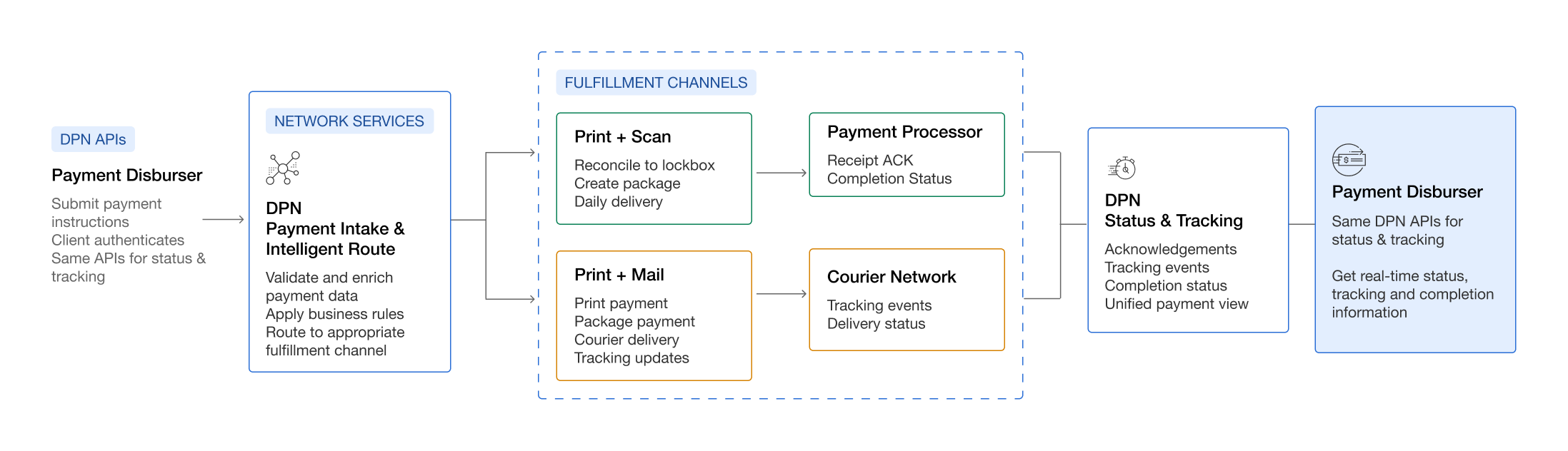
- 1
Submit Payment Instructions
The payment disburser submits payment instructions through DPN APIs and authenticates the request. - 2
Validate and Route Payment
DPN Payment Intake and Intelligent Route validates and enriches the payment data, applies business rules, and routes the payment to the appropriate fulfillment channel. - 3
Fulfill Payment
The payment follows the appropriate fulfillment channel. Print + Scan reconciles the payment to lockbox, creates the package, and supports daily delivery. Print + Mail prints and packages the payment for courier delivery and tracking. - 4
Process Fulfillment
Print + Scan payments are sent to the payment processor for acknowledgement and completion status. Print + Mail payments are sent through the courier network for tracking events and delivery status. - 5
Track Payment Status
DPN Status & Tracking consolidates acknowledgements, tracking events, completion status, and payment information into a unified payment view. - 6
Retrieve Status and Tracking
The payment disburser uses the same DPN APIs to retrieve real-time payment status, tracking, and completion information.
The Print + Scan workflow involves multiple participants. Each participant is responsible for a specific part of the payment lifecycle.
| Step | Responsible Party |
|---|---|
| Submit payment instructions | Disburser |
| Retrieve lockbox information (optional) | Disburser |
| Validate payment data | Payment Network |
| Match the payment to a lockbox destination | Payment Network |
| Send payment data for fulfillment | Payment Network |
| Produce checks | Deluxe Fulfillment |
| Scan check images | Deluxe Fulfillment |
| Return scanned check images to DPN | Deluxe Fulfillment |
| Match scanned images to the original payment data | Payment Network |
| Deliver the payment package to the lockbox provider | Payment Network |
| Process the transaction | Lockbox Provider |
| Deposit checks | Lockbox Provider |
| Return acknowledgements and status updates | Lockbox Provider |
| Update and expose payment status information | Payment Network |
| Retrieve payment status for reconciliation | Disburser |
Before submitting payments, you can use the Deluxe Directory Network (DDN) to retrieve lockbox information and validate potential destinations.
Payment Network performs destination matching during payment processing.
Pre-matching can help:
- Retrieve lockbox information before payment submission
- Validate destination information
- Identify destination issues before submission
Your application submits a payment file containing payment and remittance information to Payment Network.
After submission, you can:
- Retrieve processing errors
- Retrieve submitted payments
- Retrieve payment status information
Learn more: File Definitions →
After Payment Network receives a payment:
- 1
Payment data is validated.
- 2
The appropriate destination is identified.
- 3
Payment information is sent to Deluxe Fulfillment.
- 4
Payment artifacts and check images are generated.
- 5
Payment Network associates fulfillment artifacts with the original payment.
- 6
A payment package is delivered to the lockbox provider.
The lockbox provider then processes the transaction and returns status information to Payment Network.
Use Payment Network APIs to monitor processing outcomes and reconciliation status.
Status information helps you:
- Confirm successful processing
- Monitor payment progress
- Investigate exceptions
- Support reconciliation activities
Learn more: Payment Status →
Payments may fail due to:
- Validation issues
- Missing payment information
- Destination-matching problems
- Fulfillment issues
Applications should monitor failed payments and implement procedures to investigate and resolve exceptions.
Learn more: Error Codes & Messaging →