Deluxe for Platforms enables software providers to embed payment capabilities into their applications and support payment processing across their merchant customers.
Use this section to understand the Deluxe platform model, available capabilities, merchant onboarding processes, integration lifecycle, and requirements for moving your platform into production.
Deluxe for Platforms is designed for:
- Independent Software Vendors (ISVs)
- SaaS platforms
- Vertical software providers
- Platforms serving multiple merchants
- Developers building payment functionality into a software product
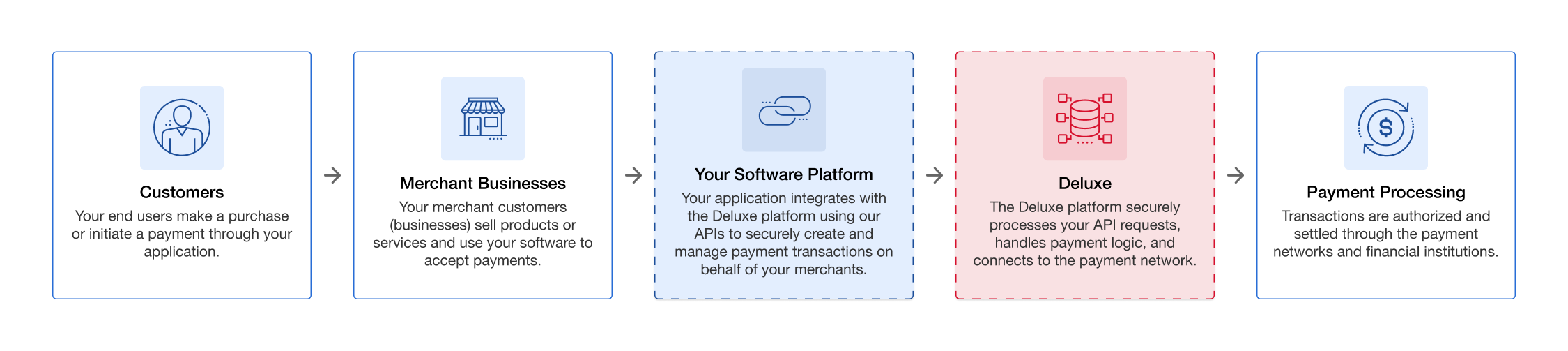
The platform model shows how a payment moves from customers and merchant businesses through your software platform to Deluxe for payment processing.
- 1
Customers Initiate Payments
Customers make a purchase or initiate a payment through your application. - 2
Merchant Businesses Accept Payments
Merchant businesses sell products or services and use your software to accept customer payments. - 3
Your Software Platform Integrates with Deluxe
Your application uses Deluxe APIs to securely create and manage payment transactions on behalf of your merchants. - 4
Deluxe Processes API Requests
The Deluxe platform securely processes API requests, handles payment logic, and connects transactions to the payment network. - 5
Payment Processing Occurs
Transactions are authorized and settled through payment networks and financial institutions.
| Role | Description |
|---|---|
| Platform / ISV | The software provider integrating Deluxe payment capabilities into its application. |
| Merchant | A business using the platform to accept payments. |
| Deluxe | Provides payment processing and platform capabilities. |
| Customer / Cardholder | The merchant's end customer making the payment. |
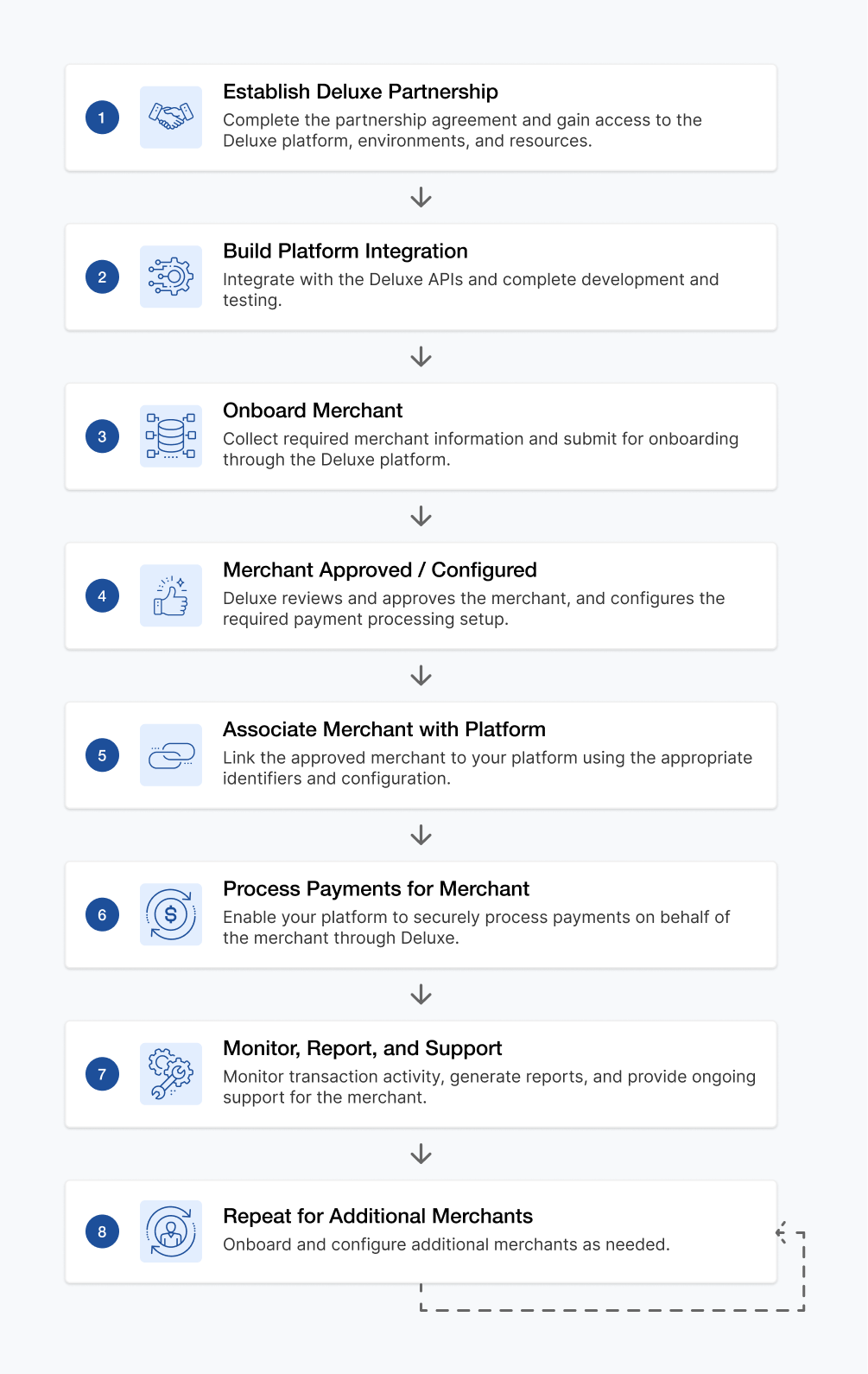
The platform relationship workflow shows the lifecycle for establishing a Deluxe partnership, integrating with the Deluxe platform, onboarding and configuring merchants, processing payments, and providing ongoing merchant support. After completing the process for one merchant, the workflow can be repeated for additional merchants.
- 1
Establish Deluxe Partnership
Complete the partnership agreement and gain access to the Deluxe platform, environments, and resources. - 2
Build Platform Integration
Integrate with the Deluxe APIs and complete development and testing. - 3
Onboard Merchant
Collect the required merchant information and submit the merchant for onboarding through the Deluxe platform. - 4
Merchant Approved / Configured
Deluxe reviews and approves the merchant and configures the required payment processing setup. - 5
Associate Merchant with Platform
Link the approved merchant to your platform using the appropriate identifiers and configuration. - 6
Process Payments for Merchant
Enable your platform to securely process payments on behalf of the merchant through Deluxe. - 7
Monitor, Report, and Support
Monitor transaction activity, generate reports, and provide ongoing support for the merchant. - 8
Repeat for Additional Merchants
Onboard and configure additional merchants as needed, repeating the merchant onboarding and management process.
| Responsibility | Platform | Merchant | Deluxe |
|---|---|---|---|
| Build software integration | ✓ | ||
| Integrate Deluxe APIs | ✓ | ||
| Provide merchant application information | ✓ | ||
| Merchant underwriting and approval | ✓ | ||
| Configure platform integration | ✓ | ✓ | |
| Process payments | ✓ | ✓ | |
| Manage customer experience | ✓ | ✓ | |
| Payment processing infrastructure | ✓ |
Accept Payments
Enable merchants to accept payments through supported online, in-person, mobile, and other payment experiences.
Recurring Payments
Support recurring or scheduled payments using stored payment credentials.
Devices
Support in-person payment experiences and merchant device management.
Reporting & Reconciliation
Retrieve and reconcile merchant payment activity.
Webhooks
Receive asynchronous notifications for supported platform and merchant activity.
Split Settlement & Partner Fees
Configure and manage applicable platform or partner fee capabilities.

The integration journey shows the six stages for moving from initial planning through production launch, including gaining Sandbox access, building the integration, testing payment workflows, and completing Deluxe validation.
- 1
Plan
Define your use case, architecture, and payment requirements. - 2
Access
Request Sandbox access and obtain API credentials. - 3
Build
Integrate Deluxe APIs, SDKs, and payment capabilities. - 4
Test
Validate workflows, transactions, and error handling. - 5
Validate
Complete Deluxe review and approval requirements. - 6
Go Live
Configure production credentials and launch processing.
- Deluxe partnership established
- Required agreements completed
- Solution and use case identified
- Supported payment capabilities identified
- Merchant model understood
- Deluxe contacts and implementation team assigned
- Deluxe Developer Portal access
- Sandbox access
- API credentials
- Applicable merchant or test account
- Supported development environment
- HTTPS endpoint for applicable webhooks
- Postman or equivalent API client
Your first merchant is the final milestone before processing live payments.
Merchant onboarding guides you through collecting business information, completing required onboarding steps, obtaining approval, and configuring the merchant for production processing.
Once approved and configured, the merchant is ready to begin accepting transactions.