Card capabilities vary based on the payment experience, transaction type, merchant configuration, and card network.
Deluxe supports card payment processing across supported card networks and payment channels.
| Card Network | Supported |
|---|---|
| Visa | Yes |
| Mastercard | Yes |
| American Express | Yes |
| Discover | Yes |
| Card Type | Supported | Considerations |
|---|---|---|
| Credit | Yes | Standard card processing supported. |
| Signature Debit | Yes | Surcharge restrictions apply. |
| PIN Debit | Yes (Card Present Only) | Surcharge restrictions apply. |
| Prepaid | Yes | Processing supported. Surcharge restrictions apply. |
| Commercial / Business Cards | Yes | Level 2 and Level 3 data supported through Payments API, Subscriptions, and Payment Links. |
| WEX Fleet | Contact Deluxe | Availability varies by configuration. |
| Voyager Fleet | Contact Deluxe | Availability varies by configuration. |
| Type | Supported |
|---|---|
| Domestic | Yes |
| International | No |
| Product | Card Support |
|---|---|
| Payments API | Yes |
| Embedded Payments SDK | Yes |
| Hosted Payment Form (HPF) | Yes |
| Vault / Stored Payment Methods | Yes |
| Wallets | Yes |
| EMV Card Present APIs | Yes |
| Devices / Terminals | Yes |
Cards may be processed using:
- Raw card data
- Token
- Vault ID (
paymentMethodId) - Cryptogram
- Network wallet credential
- EMV terminal workflow
| Capability | Card Support |
|---|---|
| Create / Purchase | Yes |
| Authorization Only | Yes |
| Partial Authorization | Yes |
| Complete / Capture | Yes |
| Void / Cancel | Yes |
| Refund | Yes |
| Partial Refund | Yes |
| Multiple Partial Refunds | Yes |
| Card on File | Yes |
| Tokenized Payments | Yes |
| Vaulted Payments | Yes |
| Recurring Payments | Yes |
| Mobile Wallet Funding Sources | Yes |
| Incremental Authorization | No |
| Multiple Captures | No |
| Authorization Extension | No |
Before accepting card payments, merchants must have:
- Active Deluxe merchant account
- Access token (
partnerToken) - Client ID and Client Secret used to generate OAuth bearer tokens
- Appropriate card payment enablement
- Developer Portal access
- Payments API access
Embedded and wallet implementations additionally require:
- Secret key
- JWT generation capability (HS256)
Depending on your implementation, additional configuration may be required.
| Feature | Additional Setup |
|---|---|
| Card Vaulting | Vault enabled |
| Tokenization | Tokenization enabled |
| Apple Pay | Merchant linking and domain verification |
| Google Pay | Merchant linking |
| Surcharging | Merchant-level enablement |
| Wallet Acceptance | Wallet enablement |
Card payments follow a standard payment lifecycle.
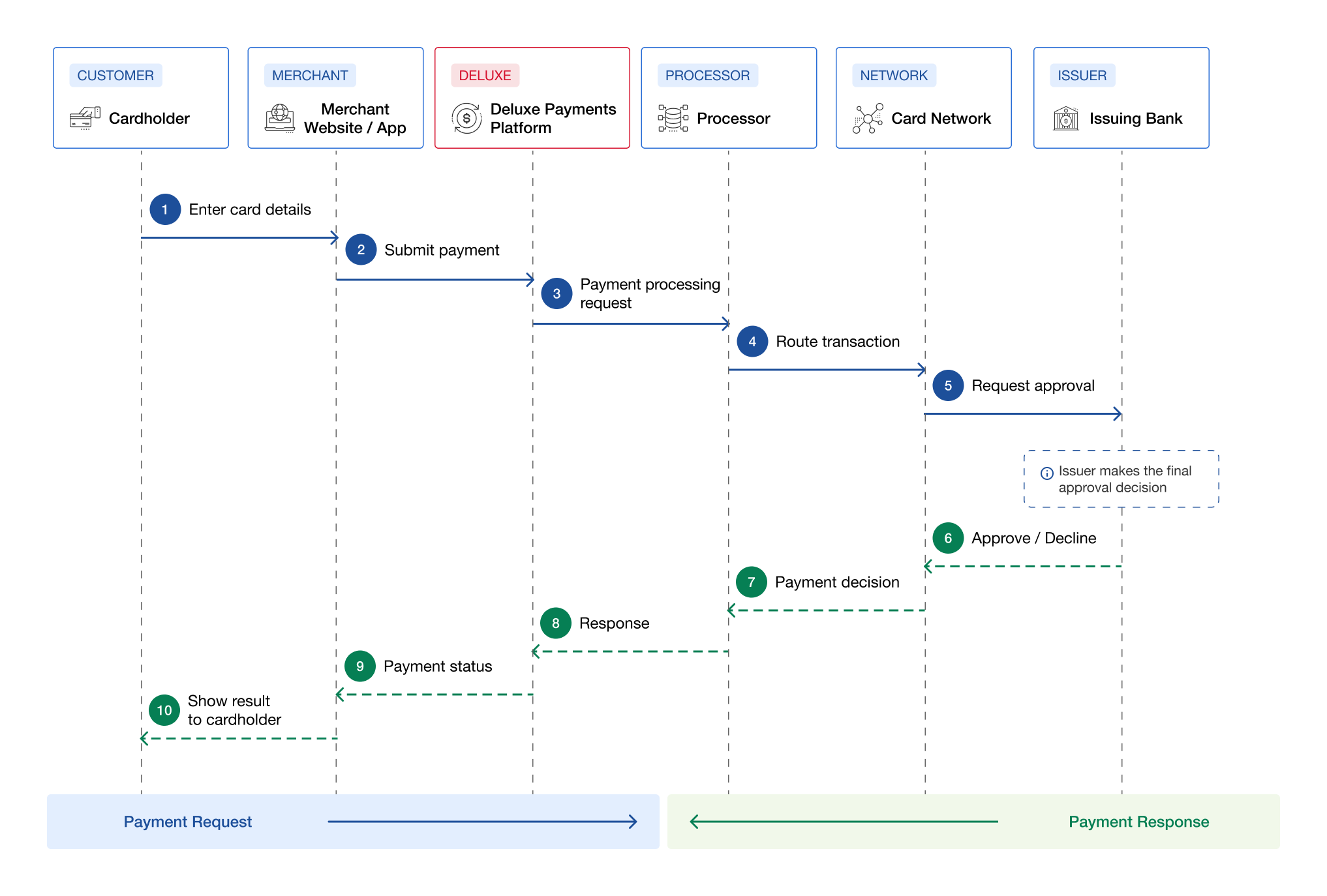
The card payment workflow shows how a payment request moves from the cardholder through the merchant, Deluxe Payments Platform, processor, card network, and issuing bank. The payment decision then follows the same path in reverse until the result is shown to the cardholder.
- 1
Enter Card Details
The cardholder enters card details on the merchant website or application. - 2
Submit Payment
The merchant submits the payment to the Deluxe Payments Platform. - 3
Send Payment Processing Request
The Deluxe Payments Platform sends the payment processing request to the processor. - 4
Route Transaction
The processor routes the transaction to the card network. - 5
Request Approval
The card network sends the approval request to the issuing bank. - 6
Approve or Decline Payment
The issuing bank makes the final approval decision and returns the approve or decline result to the card network. - 7
Return Payment Decision
The card network returns the payment decision to the processor. - 8
Return Response
The processor returns the payment response to the Deluxe Payments Platform. - 9
Return Payment Status
The Deluxe Payments Platform returns the payment status to the merchant. - 10
Show Result to Cardholder
The merchant website or application displays the payment result to the cardholder.
The issuing bank ultimately approves or declines the transaction and places a hold on available funds during authorization.
Funds remain reserved until the payment is captured or the authorization expires.
Explore Transaction Types →
AVS helps verify a cardholder's billing address by comparing the street address and ZIP/postal code submitted with a card transaction against the information on file with the card issuer. Include the cardholder's billing address and zip code when submitting an eligible transaction, then evaluate the AVS response to determine whether the information matches. Use the result alongside other fraud prevention measures to decide whether to accept, review, or decline the transactions based on your business rules.
AVS is performed automatically during:
- Create / Purchase
- Authorize
- Must include billing street address and zip code to get an AVS response
Standalone AVS Check is available through the AVS API endpoint:
- For AVS APIs, see AVS API →
- For AVS Response Codes, See Error Handling →
CVV helps verify that a customer has access to the payment card by validating the security code provided during a transaction. Include the cardholder's CVV when submitting an eligible card transaction, then evaluate the CVV response to determine whether the code matches the card issuer's records. Use the result alongside other fraud prevention measures to determine whether to accept, review, or decline the transaction, and never store the CVV after authorization.
For supported card-not-present transactions, CVV validation confirms that the verification code provided by the customer matches the value on file with the issuer.
CVV should:
- Be collected during payment
- Be submitted for verification
- Never be stored
Vaulting preserves:
- Card PAN reference
- Card reference information
- Card expiration date
Vaulting never stores CVV data.
For CVV Response Codes, See Error Handling →
EMV is supported for card-present payment experiences.
Supported capabilities include:
- EMV chip processing
- EMV authorization data
- EMV transaction certificates
- Terminal device integrations
EMV functionality is available through dedicated EMV APIs and supported terminal workflows. Explore EMV API →